 Posted by

PicsArt is one of the most popular photo editors in the world, and its Windows app brings the same creative tools to your PC. You can edit photos, remove backgrounds, make collages and design social media posts without opening a browser. It runs well on most Windows laptops, and your edits save to your PC so you can use them anywhere. This guide shows you how to download PicsArt for PC from the official source, install it safely on Windows 11 or Windows 10, and edit your first photo.
What Is PicsArt?
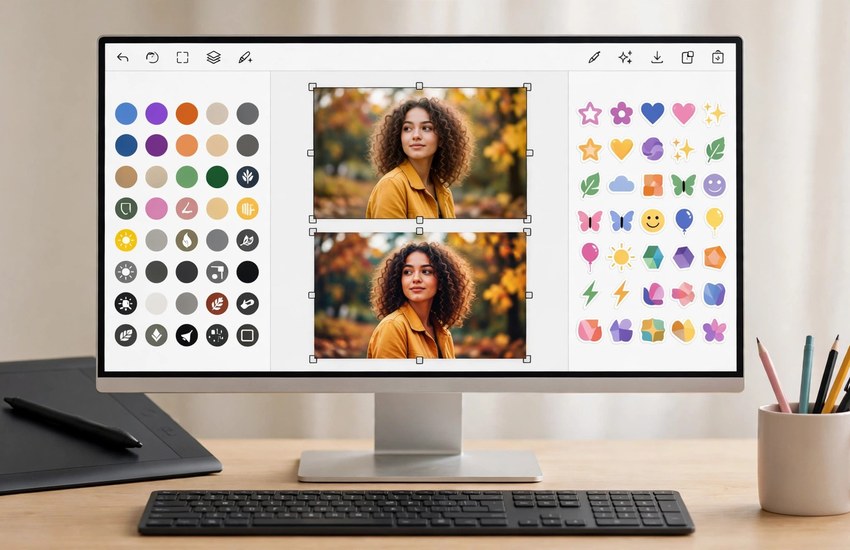
PicsArt is a photo and video editing app made for everyone, not just professionals. It started on phones and later came to Windows, where it works well with a mouse and keyboard on a big screen. The app combines a photo editor, a collage maker, a sticker library and simple design tools in one place, so you can finish a post or a thumbnail in minutes. Millions of people use it for Instagram posts, YouTube thumbnails, birthday cards and quick photo fixes. The app also has a large community: you can remix other people’s stickers and edits, and many small businesses use it to make quick social media graphics without hiring a designer.
Top Features of PicsArt
- Photo editor — crop, rotate, adjust brightness, colour and sharpness with simple sliders.
- Background remover — cut out a person or object from a photo in one click.
- Filters and effects — apply ready-made looks, from vintage film to modern portrait styles.
- Stickers and text — add stickers, fonts and text overlays to any image.
- Collage maker — combine several photos into grids, freestyle layouts and frames.
- AI tools — generate images, remove objects and enhance photos with AI features.
- Templates — start from ready-made designs for posts, stories, posters and thumbnails.
System Requirements for PicsArt on PC
- Operating system — Windows 11 or Windows 10, 64-bit.
- Processor — any modern dual-core CPU or better.
- RAM — 4 GB minimum; 8 GB is better for large photos.
- Storage — around 500 MB for the app, plus space for your photos.
- Internet — a constant connection is needed to sign in and use cloud features.
- Display — 1280 × 720 or higher.
- Account — a free PicsArt account (email or Google sign-in) is needed to save work.
How to Download and Install PicsArt on PC
- Open the Microsoft Store on your Windows PC, or the official PicsArt website (picsart.com) for the Windows app link.
- Search for PicsArt and download the official app — avoid third-party PicsArt installers.
- Wait for the Microsoft Store to finish the download and installation.
- Launch PicsArt from the Start menu.
- Sign in with your free PicsArt account, or create one.
- Allow the app to access your Pictures folder when Windows asks.
- Open a photo and start editing.
Getting Started with PicsArt
- Open a photo from your PC and try the Auto enhance button first.
- Crop the image and straighten it if the horizon is tilted.
- Try the background remover on a portrait to see how clean the cut-out is.
- Add text with a bold font for a thumbnail or a social post.
- Make a collage from your favourite photos using a grid template.
- Export your finished image as JPG or PNG and share it.
Is PicsArt Free?
Yes, PicsArt is free to download and the free version includes the core photo editor, many filters and stickers, and the collage maker. PicsArt Gold is the paid subscription, and it unlocks premium filters, the full AI toolset, all fonts and stickers, and removes ads. Gold is billed monthly or yearly, and you can cancel anytime from your account settings. For casual editing the free version is enough, and nothing in this guide requires Gold. Only download the app from the Microsoft Store or the official PicsArt website so you know it is genuine and safe.
Frequently Asked Questions
Is PicsArt safe to download for PC?
Yes, when you download it from the Microsoft Store or the official PicsArt website (picsart.com). Unofficial “PicsArt Pro” installers on random download sites can be fake or bundled with unwanted software, so use only the official source and keep your antivirus on during setup.
What is the difference between PicsArt free and Gold?
The free version covers everyday editing: crop, filters, stickers, collages and basic tools. Gold adds premium content and AI features, removes ads and unlocks the full font and sticker library. You can use the app for a long time without paying.
Can I use PicsArt without an account?
You can try some basic editing without signing in, but saving and syncing your work needs a free PicsArt account. Creating one takes less than a minute with an email address.
Does PicsArt work on Windows 11?
Yes. The official app installs and runs on Windows 11 as well as Windows 10 (64-bit), with the same features on both.
Related Guides
- Canva for PC: How to Download and Install on Windows
- PhotoScape X for PC: How to Download and Install on Windows