 Posted by

Frostpunk 2 for PC: How to Download & Install on Windows
Can your city survive the endless winter? This guide covers the frostpunk 2 download for pc process in full. You will learn how to buy, download, and install the game from the official Steam page. In addition, you will find the system requirements, the $44.99 price, and tips to keep your people alive.
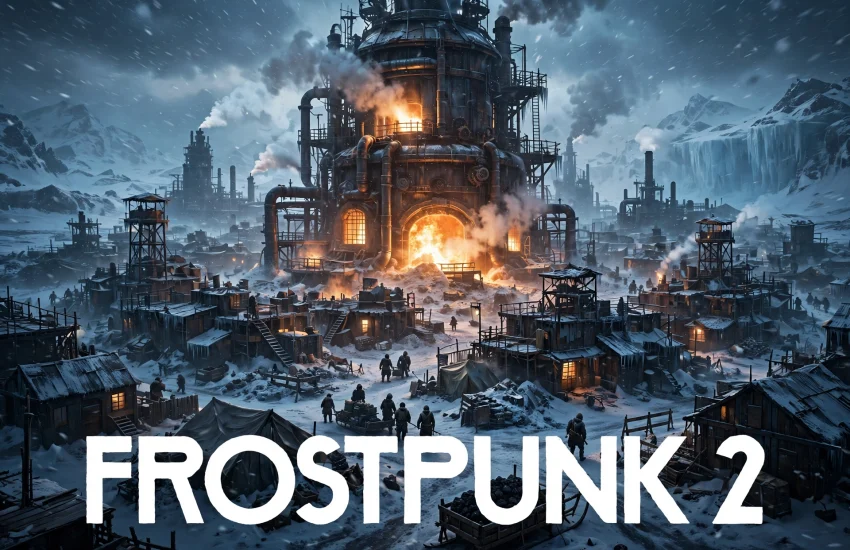
Frostpunk 2 is a survival city-builder from 11 bit studios, and it is the sequel to the hit game Frostpunk. It launched on September 20, 2024, and it takes place 30 years after the first game. The frost never ended, and your city is the last hope of humanity. As a result, every choice you make can mean life or death.
1. What Is Frostpunk 2?
Frostpunk 2 is a city-building survival game set in a frozen post-apocalyptic world. You are the Steward of New London, the last great city on Earth. Your job is to grow the city, keep the Generator running, and keep your people warm. However, the cold is not your only enemy. Factions fight over resources, and every law you pass makes someone angry.
Unlike the first game, Frostpunk 2 works on a much bigger scale. You build whole districts instead of single buildings. For example, you place housing, food, and industrial districts across the city. Each district needs workers, heat, and materials to run. The game also adds a new political layer. The Council votes on your laws, and factions push their own ideas. In short, Frostpunk 2 is part city-builder, part survival game, and part political drama.
2. Key Features of Frostpunk 2
The district system is the biggest new feature. You zone large areas for housing, food, industry, and extraction. Each district grows over time, and you can add special buildings to it. As a result, your city feels alive and always changing.
Next, the Council system changes how you rule. You propose laws, and the Council votes on them. Factions like the Pilgrims and the Stalwarts have their own goals, so you must win their support. In addition, you can use your influence to push votes your way. However, broken promises can turn a faction against you. Frostland expeditions let you explore the frozen world outside the city. You send teams to find resources, survivors, and old settlements. Finally, the game has a story mode with a full campaign, plus a Utopia Builder sandbox mode for free play.
3. Frostpunk 2 System Requirements for PC
Before you buy the game, check your PC against the official requirements. The game needs a 64-bit version of Windows 10 or Windows 11. It also needs DirectX 12 and 30 GB of free storage space. In addition, the game runs best on an SSD, so use one if you can.
Minimum requirements:
- OS: Windows 10 / Windows 11, 64-bit
- Processor: Intel Core i5-8400 or AMD Ryzen 5 2600
- Memory: 8 GB RAM
- Graphics: Nvidia GeForce GTX 1060 or AMD Radeon RX 580 (6 GB VRAM)
- DirectX: Version 12
- Storage: 30 GB available space
Recommended requirements:
- OS: Windows 10 / Windows 11, 64-bit
- Processor: Intel Core i7-10700 or AMD Ryzen 7 3700X
- Memory: 16 GB RAM
- Graphics: Nvidia GeForce RTX 3070 or AMD Radeon RX 6800
- DirectX: Version 12
- Storage: 30 GB available space
If your PC meets the recommended specs, you can enjoy smooth gameplay at high settings. On a weaker PC, lower the resolution and reduce the shadow quality. This way, the game still runs well during big snowstorms.
4. frostpunk 2 download for pc — How to Download the Official Version
The only safe way to get the game is through Steam. The frostpunk 2 download for pc process starts on the official Steam store page. You need the Steam client installed on your PC to download and play the game. Do not use any other website, because unofficial sources can contain malware.
First, open your browser and visit the official Steam page for Frostpunk 2 on Steam. Next, log in to your Steam account, or create one for free if you do not have one. Then, click the “Add to Cart” button and complete the purchase. The game costs $44.99 for the Standard Edition. After the purchase, Steam adds the game to your library, and the frostpunk 2 download for pc can begin from the Steam client.
5. Step-by-Step Installation Guide for Frostpunk 2 on Windows
First, make sure you have at least 30 GB of free space on your drive. Next, check that your graphics drivers are up to date. Outdated drivers are a common cause of crashes, so update them before you start.
Now, open the Steam client and go to your Library. Click on Frostpunk 2, then click the blue “Install” button. Choose the drive where you want the game, and confirm. Steam will now download and install the game automatically. When the download finishes, the button changes to “Play”. Before your first launch, verify the game files. Right-click the game in your Library, select Properties, then Installed Files, and click “Verify integrity of game files”. Finally, launch the game and adjust the graphics settings to match your PC.
6. How to Play Frostpunk 2 on PC: Your First Steps
When you start the game, begin with the story mode. It teaches you the basics step by step, so it is the best place to learn. Your first job is to keep the Generator running. Without heat, your people will freeze, so always watch your coal and oil supply.
Next, build housing and food districts early. Your people need shelter and meals before you expand. In addition, explore the Frostland as soon as you can. Expeditions bring back resources and survivors, and both are vital for growth. However, do not expand too fast. Each new district costs workers and heat. On PC, the game plays best with a mouse and keyboard. Also, pause the game often to think, and save before big decisions.
7. Frostpunk 2 Price and Editions
Frostpunk 2 is a paid game, and the Standard Edition costs $44.99 on Steam. This edition includes the full story mode and the Utopia Builder sandbox mode. It is the best choice for most players.
There is also a Deluxe Edition, which costs $74.99. It adds the Season Pass with future story expansions and extra in-game items. However, the core game is the same in both editions. So, if you only want the game itself, the Standard Edition is enough. Steam sales sometimes lower the price, so watch for seasonal discounts.
8. Tips to Get the Best Experience in Frostpunk 2
First, always keep a buffer of coal and food. Whiteouts can cut your income for days, so stock up before winter hits. Next, manage your factions with care. Keep at least one faction happy, and never let both of them turn against you at once.
Also, build efficiently. Place districts close to resource deposits to cut travel time. In addition, research new technology as soon as you can. Better heaters, better food production, and better laws all make survival easier. For the best experience, play with headphones. The sound of the wind and the Generator adds a lot to the mood. Finally, accept that people will die. Frostpunk 2 is a hard game, and losses are part of the story.
9. Common Problems and Fixes for Frostpunk 2 on PC
Game crashes on launch: Update your graphics drivers to the latest version, then verify the game files in Steam. This fixes most launch crashes.
Low frame rate: Lower the resolution scale and reduce the shadow quality. Also, close background apps that use your CPU.
Stuck on the loading screen: Make sure the game is installed on an SSD if possible. A slow drive can cause long loading times.
No sound: Check your Windows sound settings and set the correct output device. Then, restart the game.
Save file issues: Check that your Documents folder is not set to read-only. Also, make sure Steam Cloud is turned on in the game properties.
10. Frequently Asked Questions About Frostpunk 2
Is Frostpunk 2 free to play?
No, Frostpunk 2 is a paid game. The Standard Edition costs $44.99 on Steam, and there is no free version.
Do I need Steam to play Frostpunk 2 on PC?
Yes, you need the Steam client to download and play the game on PC. The game launches from your Steam library.
Can I play Frostpunk 2 on Windows 10?
Yes, the game supports Windows 10 and Windows 11 in 64-bit. Install the game on an SSD for the best results.
How big is the frostpunk 2 download for pc file?
The download is about 30 GB. You need at least 30 GB of free space on your drive, and future updates may add more.
Do I need to play the first Frostpunk before Frostpunk 2?
No, you do not need to play the first game. Frostpunk 2 tells its own story, and the tutorial explains the basics.
What is the difference between Story mode and Utopia Builder?
Story mode follows a set campaign with chapters and tough choices. Utopia Builder is a sandbox mode where you build your city freely.
Does Frostpunk 2 have multiplayer?
No, Frostpunk 2 is a single-player game. There is no co-op or competitive multiplayer.
Can I play Frostpunk 2 offline?
Yes, you can play the game offline once it is installed. However, you need to be online for the first activation through Steam.
Related Guides
- Valheim for PC: How to Download & Install on Windows
- Palworld for PC: How to Download & Install on Windows
- Enshrouded for PC: How to Download & Install on Windows