 Posted by

Black Myth: Wukong for PC: How to Download & Install on Windows
Want to face the Monkey King in a stunning action game, but you are not sure how to start? This guide covers the black myth wukong download for pc in full. You will learn what the game is, what your PC needs, and how to install it safely from Steam.
Black Myth: Wukong is a single-player action RPG by Game Science. It launched on 20 August 2024, and it runs through the Steam client on Windows 10 or 11. It costs $59.99, and there is no free version.
1. What Is Black Myth: Wukong?
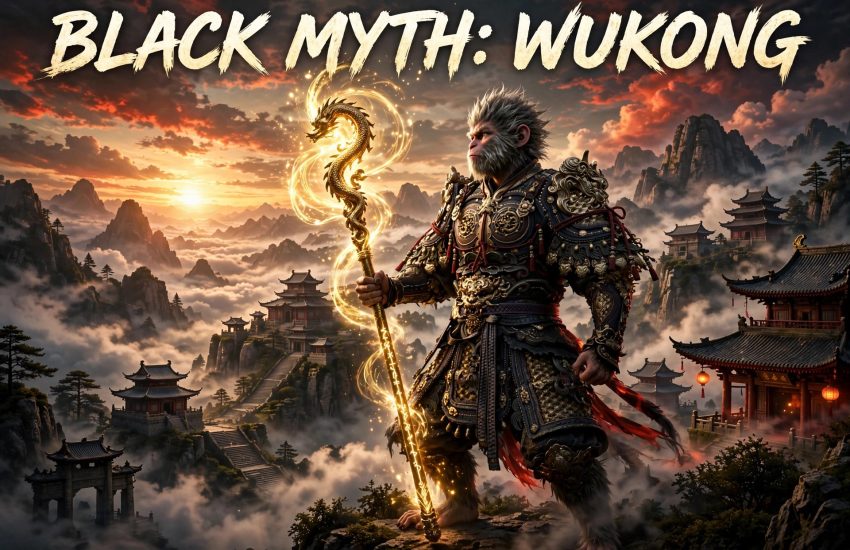
Black Myth: Wukong is an action RPG based on the classic Chinese tale Journey to the West. You play the Destined One, a monkey hero on a quest to find the relics of the Monkey King. The world is rich, strange, and full of danger.
The game focuses on boss fights, exploration, and combat. Each chapter brings new areas, new enemies, and new powers. The story is told through cutscenes, side quests, and hidden secrets.
It is a single-player game, so there is no online co-op or multiplayer. You play at your own pace, and you can take your time with each boss.
2. Why Players Love Black Myth: Wukong
First, the visuals are stunning. Lush forests, ancient temples, and huge monsters all look sharp on PC. The game won praise for its art and its atmosphere.
Second, the boss fights are tense and fair. Each boss has patterns to learn, and a win feels earned. The combat is fast, with dodges, spells, and transformations.
Finally, the story draws on a famous tale. Fans of Journey to the West will spot many characters, while new players can enjoy the plot on its own.
3. Key Features of Black Myth: Wukong
- Single-player action RPG: a full story campaign with no online play required.
- Challenging boss fights: learn patterns, dodge well, and strike at the right time.
- Stunning world: explore forests, temples, and deserts based on Chinese myth.
- Spells and transformations: unlock powers that change how you fight.
- Deep combat: light and heavy attacks, stances, and staff moves combine well.
- Rich story: follow the Destined One on a quest tied to the Monkey King.
These features work well together. The combat, the bosses, and the world all push you to explore more, even when a fight is hard.
4. Black Myth: Wukong System Requirements for PC
Check the official Steam requirements before you buy. The game is demanding, so a strong PC helps a lot.
Minimum:
- Operating system: Windows 10 (64-bit)
- Processor: Intel Core i5-8400 or AMD Ryzen 5 1600
- Memory: 16 GB RAM
- Graphics: NVIDIA GeForce GTX 1060 6GB or AMD Radeon RX 580, DirectX 12
- Storage: 130 GB of free space
Recommended:
- Operating system: Windows 10 (64-bit)
- Processor: Intel Core i7-9700 or AMD Ryzen 5 5500
- Memory: 16 GB RAM
- Graphics: NVIDIA GeForce RTX 2060 or AMD Radeon RX 5700 XT, DirectX 12
- Storage: 130 GB of free space
You also need a broadband internet connection to download the game. Update your graphics drivers first, because old drivers can cause crashes.
5. How to Download Black Myth: Wukong for PC (Official Method)
The black myth wukong download for pc is only safe from Steam. Do not use other sites, because they may offer fake or harmful files.
- Open your browser and go to the official Black Myth: Wukong page on Steam.
- Check that the page shows Game Science as the developer and a price of $59.99.
- Click Add to Cart, then sign in to your Steam account, or create a free account.
- Complete the purchase, then install Steam if the client is not on your PC yet.
- In the Steam client, find Black Myth: Wukong in your Library and click Install.
- Pick your install drive, then let Steam finish the 130 GB download. It may take a while, so use a wired connection if you can.
Steam is the only official source for this game on PC. If a site offers it for free, it is not official.
6. Step-by-Step Installation Guide
Once Steam has the game, the install is simple. Follow these steps in order.
- Open the Steam client and sign in to your account.
- Go to your Library, find Black Myth: Wukong, and click Install.
- Choose the drive and folder, then click Next to start the download.
- Wait for the download to finish. You can watch the progress in the Downloads section.
- When the game shows as ready, click Play to launch it for the first time.
- Allow Windows Firewall access if it asks, so the game can connect.
- Pick your graphics settings, then start the first chapter.
If the download stalls, pause and resume it in Steam. A large file can take time, so let it run in the background.
7. How to Play Black Myth: Wukong for the First Time
Start by learning the basic combat in the first area. Practise light attacks, heavy attacks, and dodges before you face a boss.
Next, explore each area fully. Hidden paths hold chests, spirits, and upgrades that make later fights easier.
Then learn each boss pattern. Watch its moves, dodge at the right time, and attack only when it is safe.
Finally, spend your Sparks on skills that fit your style. A good build makes hard fights feel fair, and it lets you try new tactics.
8. Is Black Myth: Wukong Free? Price and Editions
No, Black Myth: Wukong is not free. It is a paid, single-player game, and it costs $59.99 on Steam. The black myth wukong download for pc gives you the full game for that price.
- Base game: $59.99, with the full single-player campaign included.
- Free edition: there is no free edition, and no free trial on Steam.
- Released: the game launched on 20 August 2024.
Because it is a single-player game, there are no monthly fees. Buy it once, and you can play it as much as you like.
9. Black Myth: Wukong Tips for New Players
- Dodge, do not block: timing your dodge is the key to most boss fights.
- Explore every area: hidden items and spirits make your hero stronger.
- Use your spells: spells and transformations can turn a hard fight around.
- Upgrade your staff: a stronger weapon helps you deal more damage.
- Rest at shrines: shrines save your progress and refill your health.
- Be patient: learn each boss, then strike when the time is right.
New players often rush into boss fights too soon. Explore first, level up, and then push further.
10. Frequently Asked Questions (FAQs)
Q1. Is Black Myth: Wukong free on PC?
No. It costs $59.99 on Steam, and there is no free version.
Q2. Do I need Steam to play Black Myth: Wukong?
Yes. The game runs through the Steam client, so install Steam and sign in first.
Q3. How big is the black myth wukong download for pc?
The game needs 130 GB of free space, so use an SSD if you can.
Q4. When was Black Myth: Wukong released?
It launched on 20 August 2024.
Q5. Is Black Myth: Wukong multiplayer?
No. It is a single-player game only, with no co-op or online play.
Q6. What are the minimum system requirements?
You need Windows 10 64-bit, an Intel Core i5-8400, 16 GB of RAM, a GTX 1060 6GB, and 130 GB of free space.
Q7. Does Black Myth: Wukong work on Windows 11?
Yes, it works on Windows 10 and Windows 11, as long as your PC meets the requirements.
Q8. Is Black Myth: Wukong safe to download from Steam?
Yes, when you use the official Steam store page, which delivers the genuine game from Game Science.
Conclusion
Black Myth: Wukong is a stunning, single-player action RPG that is easy to start. It costs $59.99, needs 130 GB of space, and rewards patient players. Finish your black myth wukong download for pc on Steam, and start your journey as the Destined One today.
Related Guides
- Enshrouded for PC: How to Download & Install on Windows
- Palworld for PC: How to Download & Install on Windows
- Valheim for PC: How to Download & Install on Windows