 Posted by

Want to join the Firebreak team and take back the Oldest House but not sure how to start? This guide covers the fbc firebreak download for pc process step by step, so you can buy, install, and play the game the safe, official way through Steam.
FBC: Firebreak is a paid co-op first-person shooter from Remedy Entertainment. It costs $19.99 on Steam, and you need the Steam client to download and play it. Below, you will find the system requirements, the official download steps, and answers to common questions.
1. What Is FBC: Firebreak?
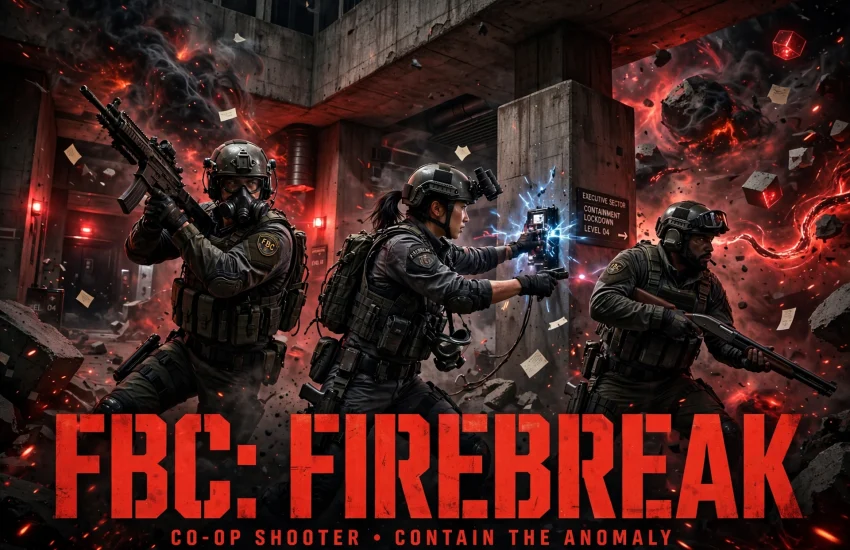
FBC: Firebreak is a 3-player co-op first-person shooter set in the world of Control. You play as a Firebreaker, a first responder of the Federal Bureau of Control, sent into the Oldest House to fight the Hiss and fix the strange crises spreading through the building.
Remedy Entertainment developed the game, and it launched on June 17, 2025. The Oldest House is a shifting, paranatural skyscraper in New York, and every job takes you into a different part of it. The game is built for teamwork, quick thinking, and fast action.
You can play jobs solo or with two friends online. In short, FBC: Firebreak is a fun and chaotic co-op shooter for fans of Control and team-based action.
2. Key Features of FBC: Firebreak
FBC: Firebreak stands out for its co-op action and strange setting. Here are the main features:
- 3-player co-op: Team up with two friends online and take on jobs together in the Oldest House.
- Crisis kits: Choose a kit such as the Fix Kit, Jump Kit, or Splash Kit, each with its own tools and powers.
- The Oldest House: Explore the shifting halls of the Federal Bureau of Control, a place full of strange objects and dangers.
- Jobs and objectives: Complete varied jobs, from repairs to containment, while fighting the Hiss and other threats.
- Requisitions and perks: Earn new gear, perks, and upgrades as you finish jobs and level up.
- Control universe: The game is set in the same world as Control, with familiar sights, sounds, and lore.
3. FBC: Firebreak System Requirements for PC
Before you download the game, check that your PC meets the official requirements. The game needs 30 GB of storage.
Minimum requirements:
- OS: Windows 10 / 11 (64-bit)
- Processor: Intel Core i5-8500 or AMD Ryzen 5 1600X
- Memory: 16 GB RAM
- Graphics: NVIDIA GeForce GTX 1070 or AMD Radeon RX 5700
- Storage: 30 GB available space
Recommended requirements:
- OS: Windows 10 / 11 (64-bit)
- Processor: Intel Core i5-12600K or AMD Ryzen 7 5700X
- Memory: 16 GB RAM
- Graphics: NVIDIA GeForce RTX 3070 or AMD Radeon RX 6800 XT
- Storage: 30 GB available space
Because the game is online, a stable internet connection matters as much as your hardware. In addition, update your graphics drivers before you launch the game.
4. FBC: Firebreak Download for PC: Official Steam Method
For the fbc firebreak download for pc, Steam is the only official source. You need the Steam client, a Steam account, and a $19.99 purchase. There is no separate installer on other stores, and you should avoid unofficial sources.
To start, open the official FBC: Firebreak Steam store page. From there, you can buy the game, download it through the Steam client, and install it on your PC. Steam handles the download, updates, and cloud saves for you.
Because the game is paid, the Steam client is required. After you buy it, the game stays in your Steam library, and you can reinstall it at any time.
5. How to Install FBC: Firebreak on Windows 10/11
Follow these steps to install the game on your Windows PC:
- Download and install the Steam client from the official Steam website, then sign in to your Steam account.
- Open the Steam store and search for FBC: Firebreak, or open its store page from the link above.
- Click the buy button, choose your payment method, and complete the $19.99 purchase.
- After the purchase, click Install and choose the drive where you want the game. Make sure you have 30 GB of free space.
- Wait for Steam to download and install the game. The download is small, so it should finish quickly on most connections.
- Once the install finishes, click Play in your Steam library to launch the game.
- On the first launch, let the game finish its setup, adjust the settings, and complete the tutorial.
If the download is slow, pause other downloads and use a wired connection. Steam also lets you pause and resume the download at any time.
6. How to Play Your First Job in FBC: Firebreak
Your first job starts in the Oldest House, where you pick a crisis kit and enter a crisis zone. The Fix Kit repairs machines, the Jump Kit gives you an electric boost, and the Splash Kit sprays water to clean up hazards. Choose the kit that fits your team.
Follow the job objectives on the screen and work with your team to clear each zone. Fight the Hiss, repair what is broken, and watch out for strange hazards like sticky notes and exploding objects. The game rewards teamwork, so stick with your squad.
When the job is done, extract safely and collect your rewards. In addition, try different kits and jobs to find your favorite play style. After a few jobs, you will have new gear and a good feel for the co-op action.
7. Is FBC: Firebreak Download for PC Free? Price and Editions
No, FBC: Firebreak is not free on PC. It is a paid game, and the standard edition costs $19.99 on Steam. You must buy it before you can download and play it.
A Deluxe Edition is also available on Steam with extra bonus content. Its price is higher than the standard edition, so check the store page for the current details. There is no free version of the game, and any site that claims to offer one is not official.
The $19.99 price covers the full game and its jobs. There are no extra charges to play, and Steam often runs seasonal sales if you want to wait for a discount.
8. FBC: Firebreak Download for PC FAQs
Is FBC: Firebreak free on PC?
No, it is not free. The game costs $19.99 on Steam, and you need to buy it before you can download it.
Where can I get the fbc firebreak download for pc?
You can download it only from the official Steam store page linked in this guide. You need the Steam client and a Steam account to complete the purchase and install.
How much storage does FBC: Firebreak need?
The game needs 30 GB of free space, which makes it quick to download and install.
Can I play FBC: Firebreak on Windows 10?
Yes, the game supports Windows 10 and Windows 11 (64-bit). Make sure your system meets the minimum requirements listed above.
Do I need a Steam account to play?
Yes, you need a Steam account and the Steam client. The game is sold and installed only through Steam on PC.
Can I play FBC: Firebreak offline?
No, FBC: Firebreak is an online game, so you need a stable internet connection even when you play solo.
Can I play FBC: Firebreak solo?
Yes, you can play jobs solo, but the game is built for 3-player co-op. Playing with friends makes the jobs easier and more fun.
Is FBC: Firebreak connected to Control?
Yes, it is set in the same world as Control. You play in the Oldest House, home of the Federal Bureau of Control, and you will see familiar places and lore.
9. Conclusion
FBC: Firebreak is a fun co-op shooter for PC at a low price. It costs $19.99 on Steam, needs the Steam client, and runs well on most modern PCs with only 30 GB of storage. Follow the steps in this guide for the fbc firebreak download for pc, and you can install it the official way in a short time.
If you enjoy team shooters and the strange world of Control, this game is worth your time. Buy it on Steam, pick your crisis kit, and take back the Oldest House with your team.
10. Related Guides
If you like PC games, check out these guides on our site:
- OpenMW for PC: How to Download & Install on Windows
- FlightGear for PC: How to Download & Install on Windows
- SuperTuxKart for PC: How to Download & Install on Windows