 Posted by

Want to return to Cyrodiil but not sure how to begin? This guide covers the oblivion remastered download for pc process step by step, so you can buy, install, and play the game the safe, official way through Steam.
The Elder Scrolls IV: Oblivion Remastered is a paid, single-player fantasy RPG from Virtuos and Bethesda. It costs $49.99 on Steam, and you need the Steam client to download and play it. Below, you will find the system requirements, the official download steps, and answers to common questions.
1. What Is The Elder Scrolls IV: Oblivion Remastered?
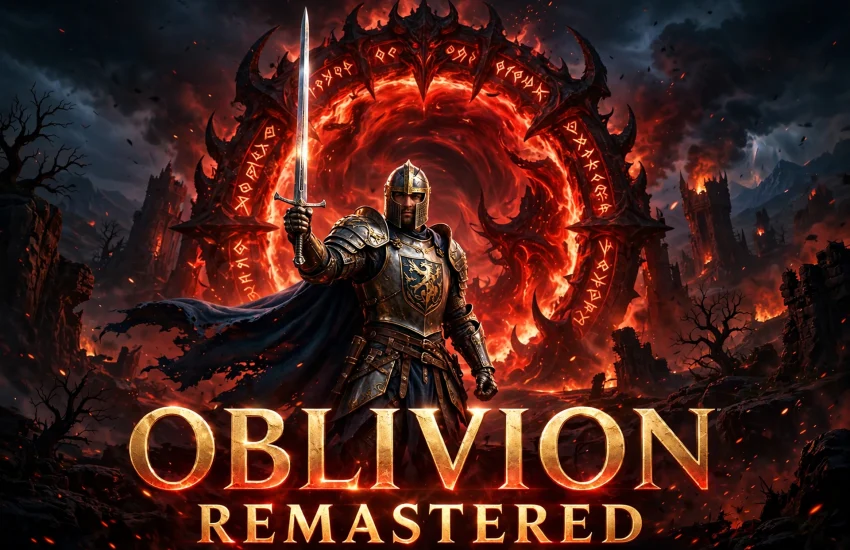
The Elder Scrolls IV: Oblivion Remastered is a modern remake of the classic 2006 RPG. You play as the Hero of Kvatch in the province of Cyrodiil. After Emperor Uriel Septim VII is assassinated, the Daedric Prince Mehrunes Dagon opens Oblivion Gates across the land, and only you can find the lost heir and stop the invasion.
Virtuos rebuilt the game with Unreal Engine 5 visuals, while Bethesda kept the original story, quests, and open world intact. As a result, the game looks modern but still plays like the Oblivion fans remember. It also includes the Shivering Isles and Knights of the Nine expansions, so you get the full experience in one package.
You can explore cities, dungeons, and forests at your own pace. Join guilds, learn spells, craft gear, and shape your hero through your choices. In short, it is one of the most beloved fantasy RPGs ever made, now rebuilt for modern PCs.
2. Key Features of Oblivion Remastered
The remaster keeps the heart of the original and adds modern polish. Here are the main features:
- Rebuilt visuals: Unreal Engine 5 graphics bring new lighting, detail, and draw distance to Cyrodiil.
- Open-world freedom: Explore the Imperial City, Kvatch, and the wilds of Cyrodiil in any order you like.
- Deep character building: Choose from 10 races, pick a birthsign, and build your own class with skills, spells, and weapons.
- Guilds and factions: Join the Fighters Guild, Mages Guild, Thieves Guild, Dark Brotherhood, and the Arena.
- Oblivion Gates: Close the Daedric gates, fight through Oblivion realms, and save Tamriel from invasion.
- Expansions included: Shivering Isles and Knights of the Nine come with the game at no extra cost.
3. Oblivion Remastered System Requirements for PC
Before you download the game, check that your PC meets the official requirements. The game needs 125 GB of storage, and an SSD is required.
Minimum requirements:
- OS: Windows 10 / 11 (64-bit)
- Processor: Intel Core i7-6800K or AMD Ryzen 5 3600X
- Memory: 16 GB RAM
- Graphics: NVIDIA GeForce RTX 2080 or AMD Radeon RX 6800 XT
- Storage: 125 GB available space (SSD required)
Recommended requirements:
- OS: Windows 10 / 11 (64-bit)
- Processor: Intel Core i7-12700K or AMD Ryzen 7 7800X3D
- Memory: 32 GB RAM
- Graphics: NVIDIA GeForce RTX 4080
- Storage: 125 GB available space (SSD required)
If your PC is close to the minimum specs, lower the graphics settings for smoother play. In addition, update your graphics drivers before you launch the game.
4. Oblivion Remastered Download for PC: Official Steam Method
For the oblivion remastered download for pc, Steam is the only official source. You need the Steam client, a Steam account, and a $49.99 purchase. There is no separate installer on other stores, and you should avoid unofficial sources.
To start, open the official Oblivion Remastered Steam store page. From there, you can buy the game, download it through the Steam client, and install it on your PC. Steam handles the download, updates, and cloud saves for you.
Because the game is paid, the Steam client is required. After you buy it, the game stays in your Steam library, and you can reinstall it at any time.
5. How to Install Oblivion Remastered on Windows 10/11
Follow these steps to install the game on your Windows PC:
- Download and install the Steam client from the official Steam website, then sign in to your Steam account.
- Open the Steam store and search for The Elder Scrolls IV: Oblivion Remastered, or open its store page from the link above.
- Click the buy button, choose your payment method, and complete the $49.99 purchase.
- After the purchase, click Install and choose the drive where you want the game. Make sure you have 125 GB of free space on an SSD.
- Wait for Steam to download and install the game. The download is large, so the time depends on your internet speed.
- Once the install finishes, click Play in your Steam library to launch the game.
- On the first launch, let the game finish its setup, adjust the graphics settings, and start a new game.
If the download is slow, pause other downloads and use a wired connection. Steam also lets you pause and resume the download at any time.
6. How to Play Your First Session in Oblivion Remastered
Your first session starts in the Imperial City prison. Create your character by choosing a race, birthsign, and class, then escape through the sewers with the Emperor’s guards. The opening teaches you movement, combat, and stealth.
After the escape, follow the main quest to Weynon Priory and then to Kvatch, where the first Oblivion Gate opens. Along the way, talk to people, pick up side quests, and collect useful gear. The game does not rush you, so explore as much as you like.
Save often, because Cyrodiil is full of surprises. In addition, join a guild early for steady quests and rewards. You can also fast travel to any place you have already visited, which makes the large map easy to manage.
7. Is Oblivion Remastered Download for PC Free? Price and Editions
No, Oblivion Remastered is not free on PC. It is a paid game, and the standard edition costs $49.99 on Steam. You must buy it before you can download and play it.
A Deluxe Edition is also available on Steam with extra bonus content. Its price is higher than the standard edition, so check the store page for the current details. There is no free version of the game, and any site that claims to offer one is not official.
The $49.99 price covers the full game and both expansions. There are no extra charges to finish the story, and Steam often runs seasonal sales if you want to wait for a discount.
8. Oblivion Remastered Download for PC FAQs
Is Oblivion Remastered free on PC?
No, it is not free. The game costs $49.99 on Steam, and you need to buy it before you can download it.
Where can I get the oblivion remastered download for pc?
You can download it only from the official Steam store page linked in this guide. You need the Steam client and a Steam account to complete the purchase and install.
How much storage does Oblivion Remastered need?
The game needs 125 GB of free space, and an SSD is required for the best performance.
Can I play Oblivion Remastered on Windows 10?
Yes, the game supports Windows 10 and Windows 11 (64-bit). Make sure your system meets the minimum requirements listed above.
Do I need a Steam account to play?
Yes, you need a Steam account and the Steam client. The game is sold and installed only through Steam on PC.
Can I play Oblivion Remastered offline?
Yes, you can play offline after the download and install are complete. Steam needs an internet connection for the purchase and the first setup, but the single-player campaign works offline.
Does Oblivion Remastered include the DLC expansions?
Yes, Shivering Isles and Knights of the Nine are included with the game at no extra cost.
Can I use mods with Oblivion Remastered on PC?
Yes, the PC version supports community mods. However, older Oblivion mods may need updates to work with the remaster, so check the mod page before you install one.
9. Conclusion
Oblivion Remastered brings a classic fantasy RPG to modern PCs with new visuals and the full original game. It costs $49.99 on Steam, needs the Steam client, and runs best on an SSD with 16 GB of RAM or more. Follow the steps in this guide for the oblivion remastered download for pc, and you can install it the official way in a short time.
If you love open-world RPGs, this remaster is worth your time. Buy it on Steam, create your hero, and return to Cyrodiil to close the Oblivion Gates.
10. Related Guides
If you like PC games, check out these guides on our site:
- OpenMW for PC: How to Download & Install on Windows
- FlightGear for PC: How to Download & Install on Windows
- SuperTuxKart for PC: How to Download & Install on Windows